

Skip to content

A clear path from source to subtitles.

Extract subtitles from your media, or bring an SRT file. Review the words, translate a saved version and export subtitles for your next handoff.

From a video moment to a subtitle fileIllustrative example
A learning scene used to illustrate subtitle text and timing.

A new idea starts with a different perspective.

1
00:00:01,000 --> 00:00:04,000
A new idea starts with a different perspective.

Timed text you can review and take into your editing or publishing workflow.

SRTVTT

Illustrative image and captions, not generated results. Switching languages changes this example only; it does not process a file or render a subtitled video.

Two ways to get started.

Extract subtitles

Turn speech or on-screen subtitles into timed text, then review and download the result.

Speech recognition supports English and Chinese audio. Chinese burned-in subtitle recognition is a preview for videos up to 200 seconds, using a preset or custom region. Review the original-language SRT/VTT output; recognition is not a quality guarantee.

Read the extraction guide
Import and edit subtitles

Import a UTF-8 SRT file into Subtitles. Review cue text and timing, save a revision, and export SRT or VTT. Importing uses storage capacity but does not incur a processing-credit charge.

Already have a transcript with timing? Keep that work and start from your existing subtitle file.

Read the import guide

Keep the words and timing in your hands.

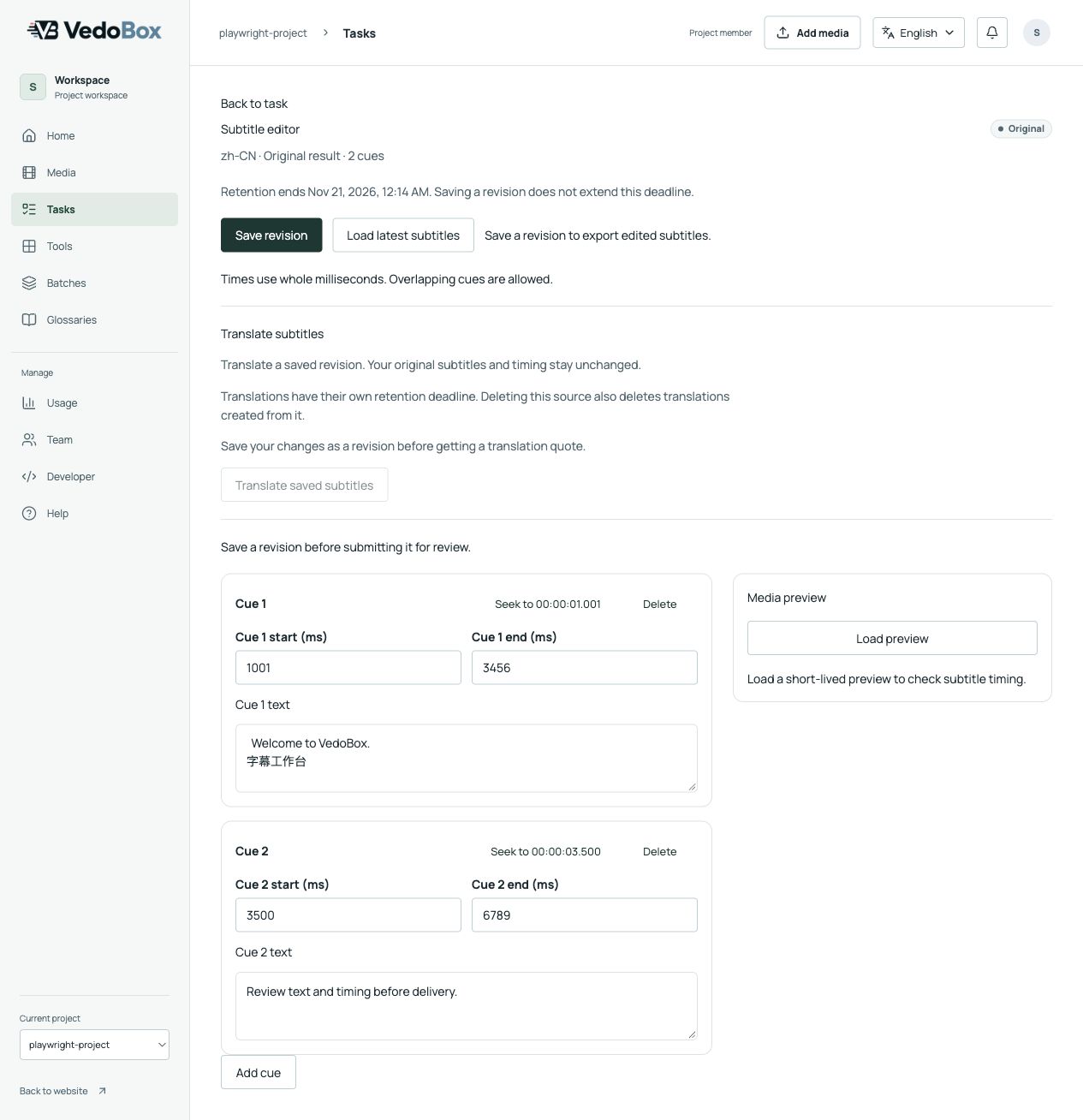
Check each cue, adjust its text and timing, and save a revision. Keep a clear version to translate or export while preserving the original result.

Translate subtitles

Keep meaning, terminology and timing in view as content moves into another language.

Import an SRT file or open an extracted subtitle result, edit and save a revision, then translate that saved revision using a language pair shown in your workspace. Review and export the translated subtitles as SRT or VTT.

Current VedoBox subtitle editor with cue text, millisecond timing and saved-revision controls, using demo data.
Current editor · Demo data. Open the image to inspect the full interface.

From a task to a deliverable

  1. Prepare your source

    Upload supported media or import an existing SRT file.

  2. Review and save

    Check the text and timing. Save the version you want to carry forward.

  3. Translate if needed

    Choose an available language pair and review the quote before starting.

  4. Export the result

    Download SRT/VTT, or collect available batch subtitles as a ZIP.

Controlled availability

Your workspace shows the effective tools, language pairs and limits before submission. Processing availability depends on your account and environment.

Subtitle removal, dubbing and final video rendering are deferred. The descriptions below explain their boundaries, not features you can start.

Remove subtitles

Planned

Generate dubbing

Planned

Make your next subtitle handoff simpler.

Check the tools in your workspace, or talk to us about access and your source material.

Request access